
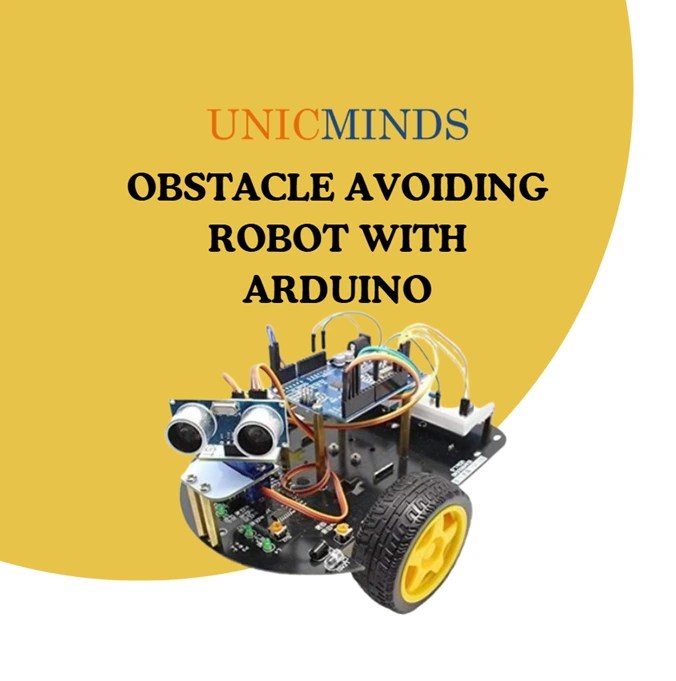
An obstacle avoiding car is a type of autonomous robot that can detect and avoid obstacles in its path without human control. It uses sensors (like ultrasonic or infrared) to sense the surroundings and makes decisions with the help of a microcontroller (Arduino, Raspberry Pi, etc.).
Working Principle Sensing:
● The car uses an ultrasonic sensor or infrared sensor to detect obstacles in front.
● The sensor continuously sends signals and measures the distance to an object. Decision Making
● The microcontroller (Arduino UNO, Nano, etc.) receives the sensor data.
● If the distance is less than a threshold value (e.g., 20 cm), the car decides to stop and change direction. Movement
● The car is controlled by DC motors (through an L298N motor driver).
● Based on sensor readings, the Arduino commands the car to move forward, backward, left, or right.
Components Required:
1. Arduino UNO
2. Ultrasonic Sensor – HC-SR04 (Generic)
3. SG90 Micro-servo motor
4. L298N Dual H-Bridge Motor Driver
5. DC Motor
6. 2WD 3-Layer Robot Chassis Kit (Aluminum)
7. 9V Battery
8. 9V Battery Connector
9. Jumper wires (generic)
Connectivity:

Applications:
● Autonomous robots and vehicles
● Smart cars and drones for navigation
● Warehouse robots for transporting goods
● Educational projects to learn robotics and automation
Working Scenario:
● The car moves forward by default.
● If the ultrasonic sensor detects an obstacle within 15 cm,
● The car stops.
● Turn left or right depending on the clear path.
● Continues moving forward
Code:
// L298N Control Pins
const int LeftMotorForward = 4;
const int LeftMotorBackward = 5;
const int RightMotorForward = 6;
const int RightMotorBackward = 7;
#define TRIGGER_PIN A1 // Arduino pin tied to trigger pin on the ultrasonic sensor.
#define ECHO_PIN A2 // Arduino pin tied to echo pin on the ultrasonic sensor.
#define MAX_DISTANCE 250 // Maximum distance we want to ping for (in centimeters).
Maximum sensor distance is rated at 250cm.
Servo servo_motor; // Servo’s name
NewPing sonar(TRIGGER_PIN, ECHO_PIN, MAX_DISTANCE); // NewPing setup of pins and maximum distance.
boolean goesForward = false;
int distance = 100;
void setup()
{
// Set L298N Control Pins as Output
pinMode(RightMotorForward, OUTPUT);
pinMode(LeftMotorForward, OUTPUT);
pinMode(LeftMotorBackward, OUTPUT);
pinMode(RightMotorBackward, OUTPUT);
servo_motor.attach(10); // Attachs the servo on pin 9 to servo object.
servo_motor.write(115); // Set at 115 degrees.
delay(2000); // Wait for 2s.
distance = readPing(); // Get Ping Distance.
delay(100); // Wait for 100ms.
distance = readPing();
delay(100);
distance = readPing();
delay(100);
distance = readPing();
delay(100);
}
void loop()
{
int distanceRight = 0;
int distanceLeft = 0;
delay(50);
if (distance <= 20)
{
moveStop();
delay(300);
moveBackward();
delay(400);
moveStop();
delay(300);
distanceRight = lookRight();
delay(300);
distanceLeft = lookLeft();
delay(300);
if (distanceRight >= distanceLeft)
{
turnRight();
delay(300);
moveStop();
}
else
{
turnLeft();
delay(300);
moveStop();
}
}
else
{
moveForward();
}
distance = readPing();
}
int lookRight() // Look Right Function for Servo Motor
{
servo_motor.write(50);
delay(500);
int distance = readPing();
delay(100);
servo_motor.write(115);
return distance;
}
int lookLeft() // Look Left Function for Servo Motor
{
servo_motor.write(180);
delay(500);
int distance = readPing();
delay(100);
servo_motor.write(115);
return distance;
}
int readPing() // Read Ping Function for Ultrasonic Sensor.
{
delay(100); // Wait 100ms between pings (about 20 pings/sec). 29ms should be the shortest delay between pings.
int cm = sonar.ping_cm(); // Send ping, get ping distance in centimeters (cm).
if (cm == 0)
{
cm = 250;
}
return cm;
}
void moveStop() // Move Stop Function for Motor Driver.
{
digitalWrite(RightMotorForward, LOW);
digitalWrite(RightMotorBackward, LOW);
digitalWrite(LeftMotorForward, LOW);
digitalWrite(LeftMotorBackward, LOW);
}
void moveForward() // Move Forward Function for Motor Driver.
{
digitalWrite(RightMotorForward, HIGH);
digitalWrite(RightMotorBackward, LOW);
digitalWrite(LeftMotorForward, HIGH);
digitalWrite(LeftMotorBackward, LOW);
}
void moveBackward() // Move Backward Function for Motor Driver.
{
digitalWrite(RightMotorForward, LOW);
digitalWrite(RightMotorBackward, HIGH);
digitalWrite(LeftMotorForward, LOW);
digitalWrite(LeftMotorBackward, HIGH);
}
void turnRight() // Turn Right Function for Motor Driver.
{
digitalWrite(RightMotorForward, LOW);
digitalWrite(RightMotorBackward, HIGH);
digitalWrite(LeftMotorForward, HIGH);
digitalWrite(LeftMotorBackward, LOW);
}
void turnLeft() // Turn Left Function for Motor Driver.
{
digitalWrite(RightMotorForward, HIGH);
digitalWrite(RightMotorBackward, LOW);
digitalWrite(LeftMotorForward, LOW);
digitalWrite(LeftMotorBackward, HIGH);
}
[Disclaimer: The content in this RSS feed is automatically fetched from external sources. All trademarks, images, and opinions belong to their respective owners. We are not responsible for the accuracy or reliability of third-party content.]
Source link
